 Storyboard Ads Studio
How to Create a Storyboard for a Video Ad (and Turn It into a Video Without Shooting)
Team at Storyboard Ads StudioWritten with AI assistance17 min readIn summary:
- An advertisement storyboard is not a pretty drawing: it is a list of shots where each scene carries six pieces of information — what is seen, how long it lasts, how the camera moves, what role it plays, what the voiceover says, and what text goes on top.
- The structure that works in short video is four beats: hook → development → product → closing. With 4 or 5 scenes of 5 seconds each, you have a 20-25 second ad.
- Describe each shot in three sentences at most and in this order: subject, action, framing, environment, light. And never put the text inside the shot: the on-screen text is added later, as a layer.
- Storyboard Ads Studio breaks your idea into 3-8 scenes, generates the frame for each, animates it, and edits the video with voice, music, subtitles, and logo. A maximum of 10 scenes per ad, each 3, 5, or 10 seconds long.
- What the app does not do: publish alone on Meta or TikTok, clone your voice, sync lips in dubbing, or edit on a timeline. What it does: let you decide everything on paper before spending a single generation.
Almost everyone looking for "how to make a storyboard for an ad" has the same problem: the video idea is clear in their head, but there is no production company, no budget, or no time to discover in editing that the ad does not work. This guide explains how to build the storyboard of a short ad shot by shot, with the structure, durations, and how to describe each scene so it can be executed — and how to turn it into a video without filming with Storyboard Ads Studio, the storyboard ad app from AIsToHire.
The figures and catalogs of the app that appear in this article have been verified against the code of Storyboard Ads Studio on October 25, 2026.
The storyboard of an ad is the list of shots with their timings, not a pretty drawing
The storyboard of an ad is the ordered sequence of shots of the video, with one vignette per scene and, next to each vignette, the data needed to execute it: duration, camera movement, role in the story, and what is heard. It is done before filming or generating because it is the only moment when changing something costs zero: moving a scene on paper takes two seconds, redoing it in video takes minutes, credits, or a day of shooting.
A useful storyboard panel always has these six fields. They are, literally, the fields that each scene holds in Storyboard Ads Studio:
| Field | What it answers | Example |
|---|---|---|
| Description | What is seen in the frame | "Dim background, a beam of light falls on the empty floor" |
| Duration | How many seconds it occupies | 3, 5, or 10 seconds |
| Movement | What the camera or subject does | Dolly forward, smooth |
| Narrative role | What that scene is for | Hook, development, product, or closing |
| Voiceover | What is heard on top | "What you were looking for, finally" |
| On-screen text | What on-screen text appears and where | "-30%" at the bottom center |
If a panel cannot answer all six, it is not yet a storyboard: it is an idea.
The four-beat structure supports almost all short ads
Hook, development, product, and closing. These four ordered roles cover the vast majority of ads from 15 to 30 seconds, and they are the four roles that the app assigns to each scene (hook, body, product, cta). The practical rule: the hook occupies the first seconds and explains nothing, it just compels you to look; the product cannot appear last.
| Time | What it needs to achieve | Typical seconds | Common mistake |
|---|---|---|---|
| Hook | To not be skipped: a strange image, a contrast, a sudden movement | 3-5 s | Starting with the logo or with an explanatory shot |
| Development | To provide context or show the friction that the product resolves | 3-5 s | Extending it and eating into the product time |
| Product | To show what it is, clearly and without noise around | 5-10 s | Showing it covered by text or too late |
| Closing | To leave clean space for the offer and call to action | 5 s | Full composition, with no space to place the on-screen text |
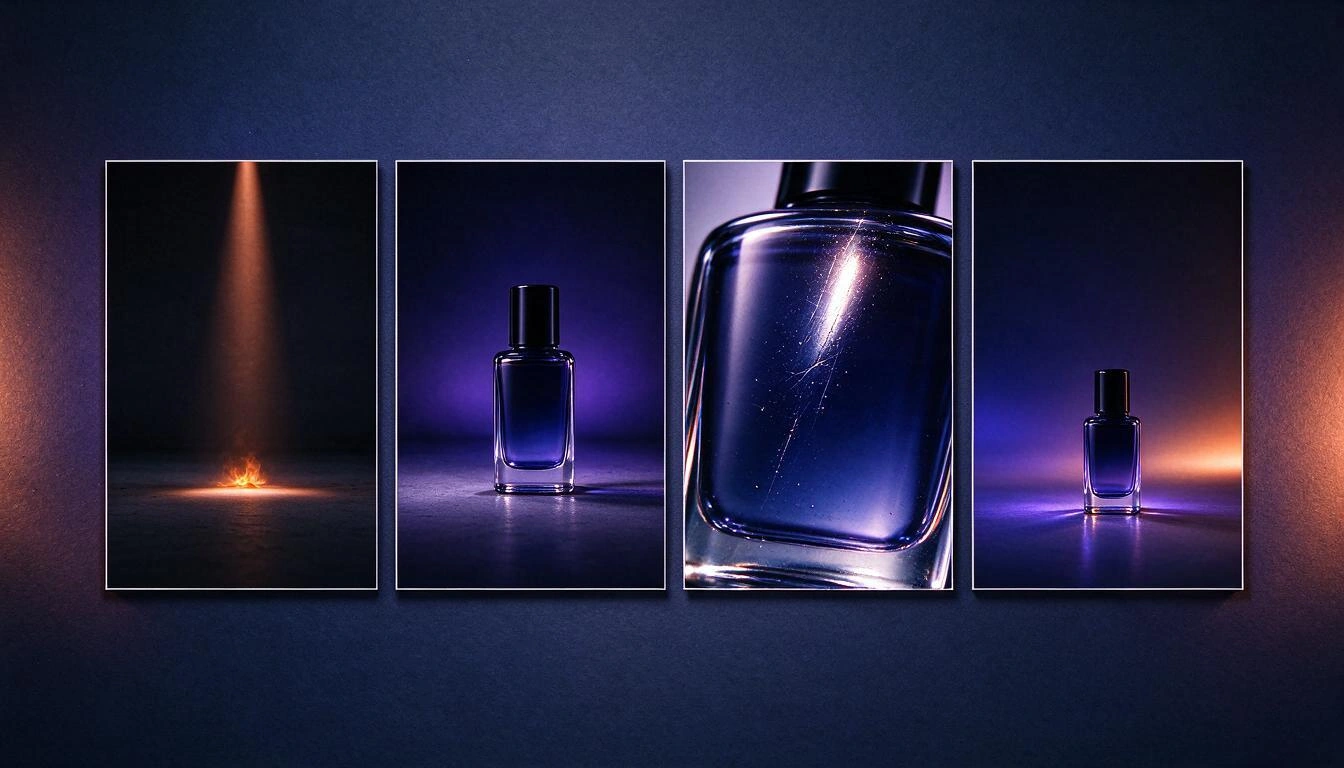
Notice the fourth vignette: the product is small and at the bottom, with the upper half empty. That is not a poorly composed shot; it is a shot prepared for the on-screen text. Planning the text gap in the storyboard avoids the most common problem at the end: having a beautiful closing and no place to write the price.
Four or five scenes are enough: the grid of 3, 5, and 10 seconds
For a social media ad, 4 to 6 scenes is the healthy range. Storyboard Ads Studio suggests between 3 and 8 scenes when generating the storyboard from your brief, and allows a maximum of 10 per ad; each scene lasts 3, 5, or 10 seconds, nothing in between. This grid is not a whim: image-to-video models generate clips of fixed duration, so the storyboard is thought out in blocks.
| Scene Duration | When to use it | What happens inside |
|---|---|---|
| 3 s | Quick cuts, transitions, supporting shots | A 5 s clip is generated and trimmed from the beginning or the end |
| 5 s | The default value: most of the shots | Native 5 s clip |
| 10 s | Only complex action: a long journey, a transformation | Native 10 s clip, the most expensive to generate |
Winning combinations:
| Scenes | Breakdown | Total | Purpose |
|---|---|---|---|
| 4 | 5+5+5+5 | 20 s | The standard Reels or TikTok ad |
| 4 | 3+3+5+5 | 16 s | Urgent version, with countdown |
| 5 | 5+5+10+5+5 | 30 s | YouTube pre-roll or product demo |
| 6 | 5×6 | 30 s | Story with before and after |
Once you have the ad assembled, the app's duration optimizer suggests trims to 15, 30, and 60 seconds while always preserving the hook, the product appearance, and the call to action, keeping the total within ±2 seconds of the target.
Describe each shot in three sentences: subject, action, framing, environment, and light
The description of a scene must be executable by someone who was not in your head. The format that works, both for a director and for a generative model, is: what subject, doing what, with what framing, in what environment, and with what light, in three sentences at most. The camera movement is separate, as it is applied later, during animation.
| Poor description | Why it fails | Executable description |
|---|---|---|
| "A beautiful scene of the product" | There is no subject, framing, or light | "Overhead shot of the jar on white marble. A faceless hand turns it a quarter turn. Warm side light and long shadow." |
| "The customer is happy" | Abstract: a feeling cannot be photographed | "Hands setting a neatly arranged breakfast table, with the packaging in the foreground. Natural window light, warm tones." |
| "Large text: 50% OFF" | The text does not belong in the shot | "Smooth gradient background with the product small and centered at the bottom, two-thirds of the top empty." + label "-50%" as a layer |
Three rules that save most regenerations:
- One shot per scene. No "and then the camera goes to...". If there are two actions, they are two scenes.
- Text never inside the frame. Image models write letters poorly. In Storyboard Ads Studio, the frame prompt explicitly states "no text, no watermark, no captions", and labels, subtitles, and logos are added later as layers in the edit, where they can be edited without regenerating anything.
- Repeat anchors between scenes. If the product or character needs to be recognizable, define them once and reference them: the app allows up to 6 recurring characters, each with a sheet of three views (front, three-quarters, and profile) that is used as a reference in all scenes.
Eight already solved ad structures, with their times
If you don’t want to start from scratch, use a known skeleton. Storyboard Ads Studio brings eight narrative templates; each consists of four scenes with their description, camera movement, and duration already assigned, and the only thing that changes is the product.
| Template | Designed for | Visual style it brings | Scenes | Duration |
|---|---|---|---|---|
| Hero product | E-commerce, generic | Product in studio | 4 | 20 s |
| Problem → solution | Services, apps | Lifestyle | 4 | 20 s |
| Staged testimonial | Services, creators | Cinematic | 4 | 20 s |
| Dramatic reveal | E-commerce, apps | Neon / cyberpunk | 4 | 25 s |
| Before / after | Services | Lifestyle | 4 | 18 s |
| Countdown / urgency | E-commerce | Cinematic | 4 | 16 s |
| Sensory food | Food | Cinematic | 4 | 20 s |
| Beauty / glow | Cosmetics | Product in studio | 4 | 20 s |
Inside, they all respect the four times. "Hero product", for example, goes like this: Entry (background in shadow, a beam of light over the empty space, dolly forward, 5 s, hook) → Reveal (the product appears centered with studio light, camera orbit, 5 s) → Detail (macro of the texture with sparkles running over the surface, pan to the right, 5 s) → Closure (product centered on a clean background with free space, zoom out, 5 s).
From storyboard to video: the five steps that Storyboard Ads Studio goes through
The path is always the same: storyboard → frame → clip → audio → editing. The app first generates a still image for each scene (the frame), animates it with an image-to-video model, and only at the end combines the clips and adds voice, music, and text. Deciding in the storyboard is free; generating is not, and that's why the order matters.
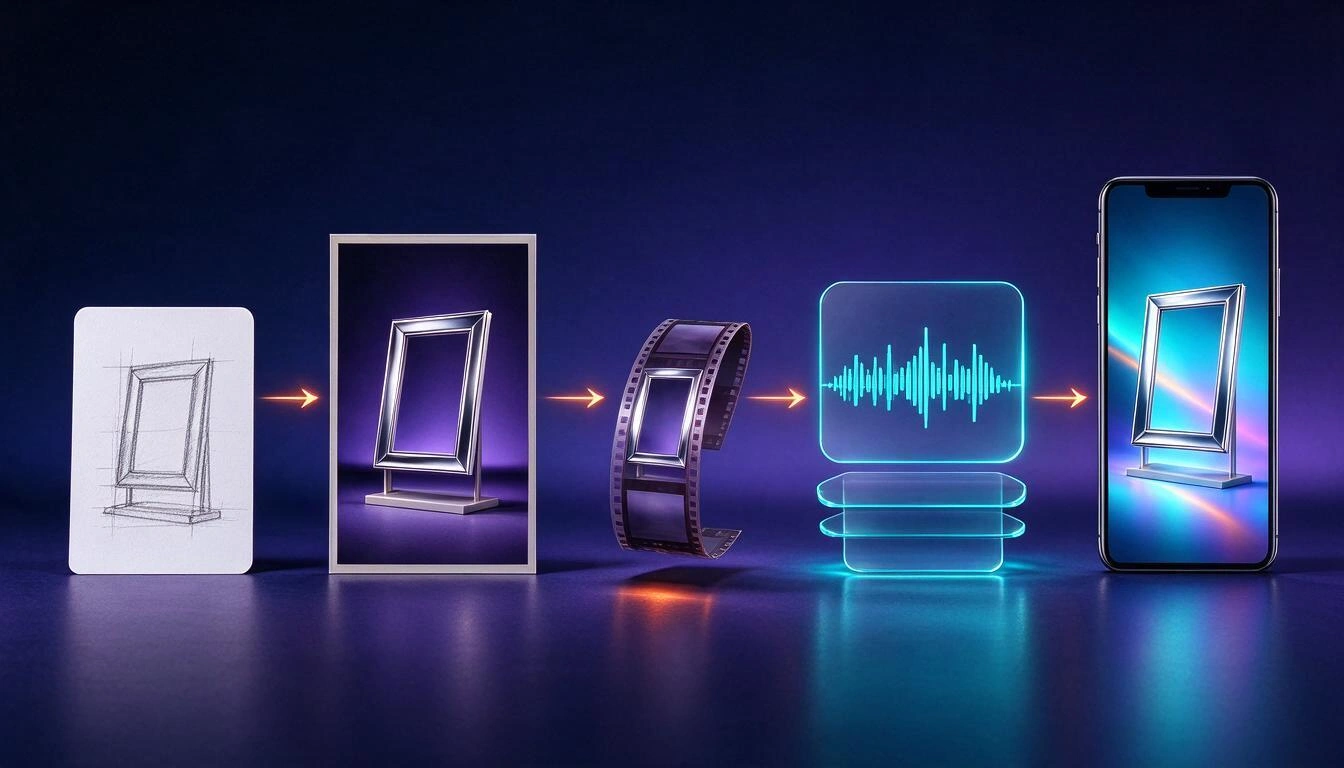
- Storyboard. You describe the ad, paste the product URL, upload the script in PDF, DOCX, or TXT, upload a reference ad (up to 200 MB and 90 seconds) for it to analyze its structure, or parts of a template. The AI returns the scenes, and you edit them, reorder them, delete them, or request changes via chat.
- Frame. Each scene is converted into a still image in one of the 10 visual styles. If you upload a sketch — a photo of a pen drawing is acceptable — it is used as a composition reference, with three levels of fidelity: strict, medium, or just as inspiration.
- Clip. The frame is animated with one of the 11 camera movements (zoom, pan, dolly, orbit, parallax, slow motion…) and three intensities, or with one of the 7 transformation effects (melt, inflate, burst into confetti, freeze, disintegrate…).
- Audio. Narration per scene with AI voice in four tones, music from the Jamendo catalog in six environments with automatic volume lowering under the voice, and synthesized sound effects (whoosh, impact, click, riser, pop).
- Editing. The clips are joined with a hard cut or one of the three chained transitions, and on top are the animated on-screen texts, subtitles, lower third, logo, and outro. An MP4 at 30 fps is produced.
There is a shortcut: the quick eraser chains frames → clips → voice → editing all at once, to see the entire ad before fine-tuning scene by scene.
The order matters because editing invalidates what you had already generated
This is the part that saves the most money. In the app, each scene goes through the states draft → frame → frame ready → video → ready, and there are changes that invalidate what has been generated:
| If you change… | It invalidates | What it means in practice |
|---|---|---|
| The description, the character, the product, or the style | The frame and the clip | Both need to be regenerated: decide it in the storyboard |
| Just the frame (regenerate or retouch) | The clip | The frame is re-animated |
| The movement or the duration | Only the clip | The frame is preserved |
| Music, voice, subtitles, titles, or logo | Only the editing | No image or video generation is touched |
That's why it's advisable to approve the entire storyboard before generating a single frame, and to approve all frames before animating. The app saves up to 10 versions per type and scene (sketch, description, frame, clip, and narration), so going back is always possible.
The text goes in the center: the top and bottom stripes are occupied by the social network
Vertically, the platform paints its own interface over your video: account name, description, buttons, and, at the bottom, the system bar. If you place the title there, it disappears. These are the margins that Storyboard Ads Studio draws as a safe zone and checks when reviewing the ad:
| Platform | Top margin | Bottom margin | Left margin | Right margin |
|---|---|---|---|---|
| TikTok | 6 % | 22 % | 4 % | 20 % |
| Instagram Reels | 8 % | 20 % | 4 % | 16 % |
| Instagram Stories | 12 % | 16 % | 5 % | 5 % |
| YouTube Shorts | 6 % | 18 % | 4 % | 16 % |
| Feed | 4 % | 10 % | 4 % | 4 % |
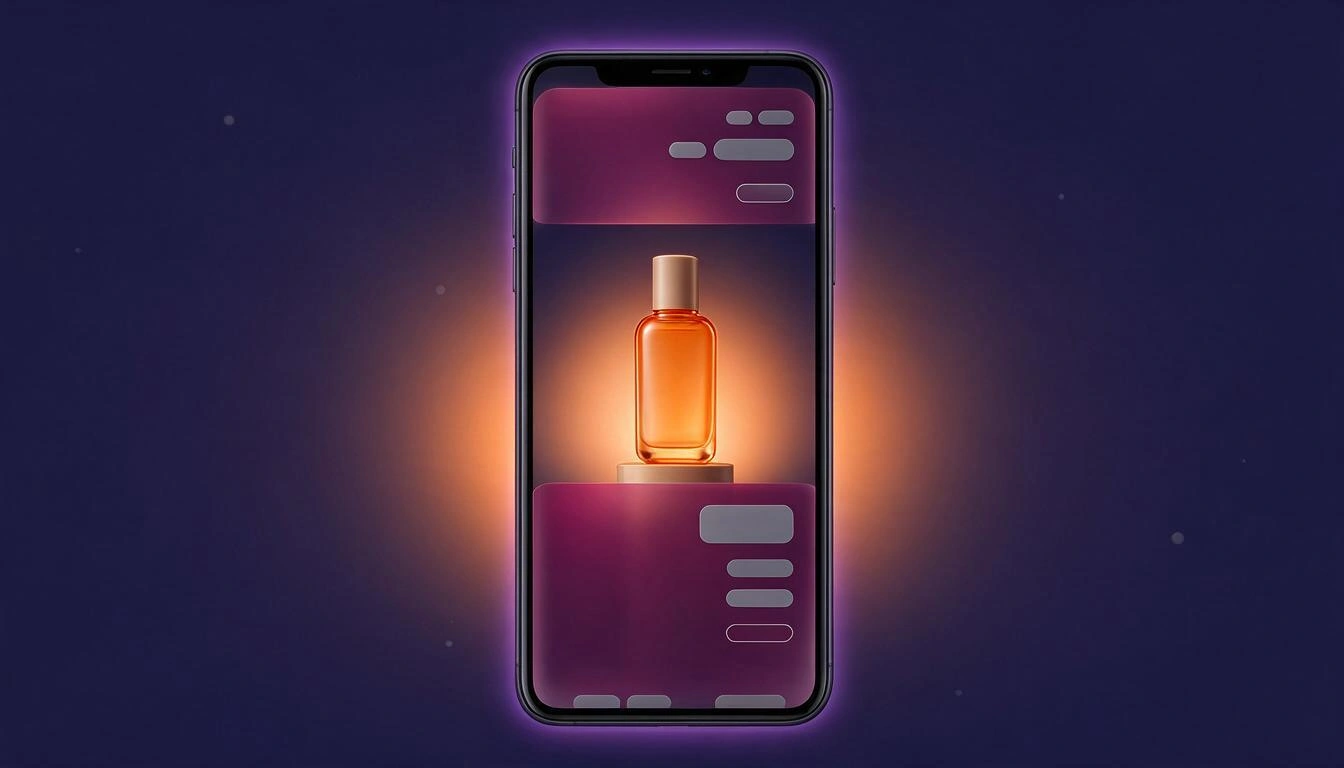
Translated: on TikTok, the bottom 22% and right 20% of the screen are no man's land. The on-screen texts are placed in one of the 9 available anchors, and the app's previewer can overlay those stripes so you can check before exporting that nothing important falls below.
Before publishing, review duration, format, and what you promise
The app includes a pre-check that reviews three things: that the duration and format fit the chosen platform, that the brand is applied, and that the texts do not contain problematic claims. These are the thresholds it uses:
| Platform | Maximum recommended duration | Accepted formats |
|---|---|---|
| TikTok | 60 s | 9:16 |
| Instagram Reels | 90 s | 9:16 |
| Instagram Stories | 60 s | 9:16 |
| YouTube Shorts | 60 s | 9:16 |
| Feed | 120 s | 1:1, 4:5, 16:9 |
Regarding texts, the reviewer flags expressions like cure, miracle, guaranteed, 100% safe, risk-free, immediate results, or free forever, and also runs the script through an AI review oriented to the advertising policies of Meta, TikTok, and YouTube.
Two honest warnings: that review is indicative and does not replace reading the current policies of each platform nor, in regulated sectors (health, finance, legal), the judgment of whoever must validate the piece. And the ad score provided by the app (hook, rhythm, product presence, clarity, and suitability for the platform) is an estimate of best practices, never a prediction of results.
What Storyboard Ads Studio Does and What It Doesn't Do
It creates scene-by-scene video ads from an editable storyboard and exports them ready to upload. It is not a video editor or a campaign manager, and there are things you should know before getting started:
| Does | Does Not |
|---|---|
| Editable 3-8 scene storyboard before generating anything | Publish directly to Meta, TikTok, or YouTube Ads: download the MP4 |
| Frame per scene in 10 styles, with your sketch as a reference | Timeline editing with layers and keyframes |
| Animation with 11 camera movements and 7 effects | Clone your voice: use AI voices from the catalog |
| Narration per scene, music with ducking, and synthesized effects | Library of recorded soundscapes |
| Versions of the same ad in up to 5 languages | Lip-syncing in those translated versions |
| Export in 9:16, 16:9, 1:1, and 4:5, at 720p, 1080p, or 4K | AI reconstruction in 4K: rescaling is lanczos with enhancement |
| Reframing to other formats with manual panning | Automatic subject tracking when reframing |
| Subtitles in three styles, including word-for-word karaoke | Real word-for-word alignment: timings are distributed proportionally |
| Clone the structure, rhythm, and style of a reference ad | Transcribe the audio of that ad |
| ZIP with frames, clips, audio, SRT, and the storyboard in PDF | Expiration playback page: sharing gives the direct URL of the MP4 |
The PDF of the storyboard, by the way, is the deliverable most used with clients: an A4 sheet with a thumbnail of each scene, its description, duration, camera movement, and voiceover. It comes from the same project, without any formatting.
Frequently Asked Questions
How many scenes should an ad storyboard have?
Between 4 and 6 for a 20 to 30-second social media ad. Storyboard Ads Studio suggests 3 to 8 when generating the storyboard from your brief and allows up to 10 per ad; the edit needs at least 2.
Can I use my own hand-drawn sketches?
Yes. You can upload a sketch per scene — a photo of a pencil or pen drawing is fine — and choose how much to adhere to it: high fidelity (strictly follows the composition and framing), medium (respects it but renders the shot in the chosen style), or low (just as inspiration for the framing).
Do I need to know how to edit video or animate?
No. There is no timeline or layers to manage: you describe the scene with words, choose the movement from a list of 11, and the app generates the frame, animates it, and edits the ad. What you do need is to know what you want to convey, and that's what the storyboard is for.
What do I do if a scene comes out wrong?
You regenerate it alone, without touching the others. You can also tweak just one area of the frame by painting it with your finger and saying what to change, apply a light or weather adjustment (golden hour, night, cloudy, rain, fog, more light, more contrast), or revert to any previous version from the scene's history.
Can I have the same character or product in all scenes?
Yes. You can define up to 6 recurring characters with their description and a three-view sheet that is used as a reference in each scene, and upload a photo of your product so the app can crop it against a clean background and include it in the scenes you mark.
Can I download the storyboard in PDF to show to a client?
Yes. The asset export generates a ZIP that can include the frames, clips, audio, .srt subtitle file, the final video, and an A4 PDF of the storyboard with one row per scene: thumbnail, title, description, duration, movement, and voiceover.
How long does it take to generate a complete ad?
It depends on the engine and the generation queue, so there is no guaranteed time: each frame and each clip are independent tasks running in the background while you continue working. As a safety net, a job that exceeds 25 minutes without finishing is marked as failed so you can retry it.
Is it suitable for ads without people?
Yes, there is a faceless mode that prohibits faces and identifiable people in all scenes: only product, environments, hands, or silhouettes from behind. The app also suggests B-roll shots without people to complete the ad.
In what formats and resolutions is it exported?
In 9:16 (1080×1920), 16:9 (1920×1080), 1:1 (1080×1080), and 4:5 (1080×1350), with qualities 720p, 1080p, and 4K. From the same project, you can also produce short versions of 15, 30, or 60 seconds, A/B variants of the hook, the closing, the style, the music, or the duration, and up to 20 product variants in a batch with variables.
Is it necessary to have the product photographed?
It is not mandatory: if you do not upload a photo, the scene is generated from the description. But if you want your product to be recognizable — same shape, same colors, same label — upload it: the app crops it against a clean background and uses it as a reference for each frame where you have marked it.
The ad is decided in the storyboard
A good short ad is decided on paper: four beats, four or five scenes, three phrases per shot, and the space for the intended title from the beginning. What changes now is that this paper no longer stays on paper.
Storyboard Ads Studio is the app from AIsToHire that turns a storyboard into a video ad: it breaks your idea into editable scenes, generates the frame for each one, animates it, and edits the final video with voice, music, subtitles, and your logo, ready for 9:16, 16:9, 1:1, or 4:5. It is at Storyboard Ads Studio — AI video ads, scene by scene and you can start with the storyboard, which is the part that costs nothing to get wrong.
Share your idea and view the storyboard before generating anything: create your free account at Storyboard Ads Studio and assemble your first ad scene by scene.
Share your idea and view the storyboard before generating anything: create your free account at Storyboard Ads Studio and assemble your first ad scene by scene.Keep reading
View all articles →
AI-generated video ads: what you need to label before December 2, 2026

Why Your Car Insurance Increased in 2026: Average Premium of €1,412 and Historic Record

Discussing via WhatsApp or talking in person: what science says about couple conflicts through messages
